
DM Play UPI-QR Deposit: How To Add Money Step By Step
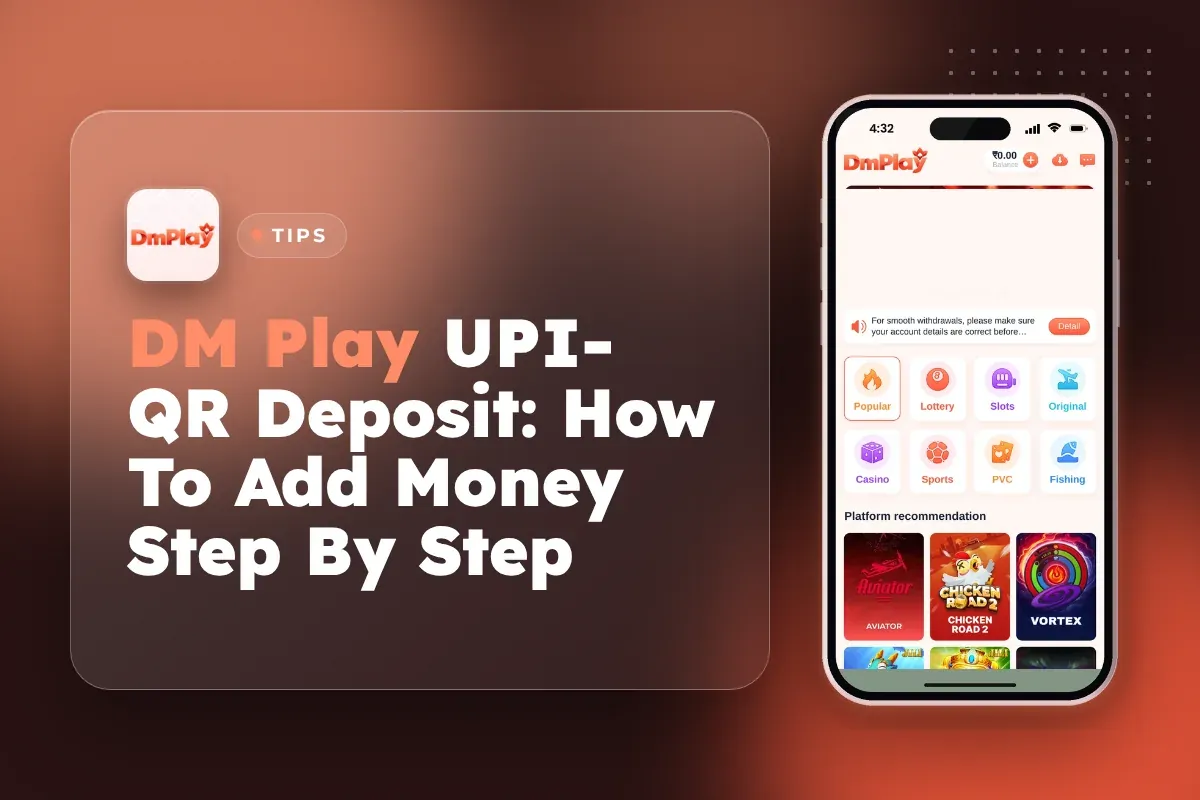
A DM Play UPI QR deposit is done in roughly a minute. Go to your Account section and choose Deposit, then select UPI-QR. Key in any sum from ₹100 up to ₹50,000 and scan the code that appears using PhonePe, Google Pay, Paytm or another UPI app. Once the payment matches your order, the balance is updated.
Technical glitches are rarely why deposits fail. Usually a player sent ₹499 for a ₹500 order, paid once the timer had expired, or cancelled the order even though the bank had already debited the amount. The steps below follow the proper sequence, along with the rules that decide if your money is credited and the action to take if your balance stays the same.
If you have not opened an account yet, do that first. The Register form needs an invite code, and you can use 216651031605.
- Minimum Deposit
- ₹100
- Maximum Deposit
- ₹50,000 per order
- Payment Apps
- Any UPI app
- Deposit Channel
- Smart pick, auto-assigned
- Where To Track
- Deposit history
- Invite Code
- 216651031605
Quick Menu
What You Need Before Your First DM Play Deposit
You need a registered account, a working UPI app with enough balance, and about two minutes without interruptions. The deposit page sits behind the login, so nothing happens until your account exists and you are signed in.
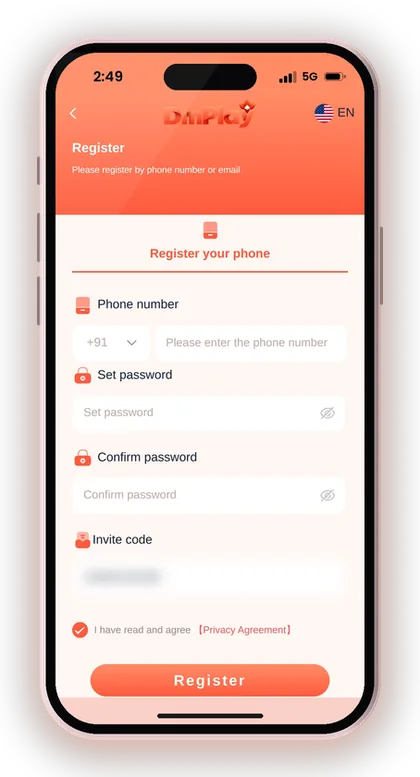
New players often register in a rush on the DM Play login and register page and forget the password a day later, just when they want to add money. Write your password down when you set it. If it is already gone, use the DM Play forgot password steps before you try to deposit.
- An account registered with invite code 216651031605
- Your phone number or email and password ready to log in
- A UPI app with enough balance in the linked bank account
- Steady mobile data or Wi-Fi for as long as the timer is running
How To Do A DM Play Register Before Depositing
To sign up, you need to provide a phone number or email, then a password that you type twice, along with an invite code. The form won't submit if the invite code field is empty. Type in 216651031605, select the Privacy Agreement checkbox and press Register.
Use a phone number you actually keep. Login, password resets and help from support all link back to that number. A borrowed or temporary SIM causes trouble later, usually at the worst time, when money is sitting in your balance and you cannot get back into the account.
Does Your UPI App Need Anything Special?
No. Any UPI app that can scan a QR code works, including PhonePe, Google Pay and Paytm. What matters more is your bank's daily UPI limit and having enough money in the linked account before you create the order.
Check your balance in the UPI app first. If the payment fails halfway because of low funds, you lose time on the countdown and may need to create a fresh order anyway. Players who keep a separate bank account just for gaming find it much easier to keep track of their spending.
Useful Advice: Log in on the DM Play app or mobile website before you open your UPI app, so you are not switching screens while the countdown runs.
How To Deposit Money On DM Play With UPI-QR
Here are the DM Play UPI deposit steps in order. Tap Account at the bottom, tap Deposit, select UPI-QR, keep the Smart pick channel, type your amount, then tap Deposit to create the order and pay it from your UPI app.
The Smart pick channel is assigned automatically, so you do not need to choose a payment route yourself. The confirmation line under the amount box reads Recharge Method UPI-QR and Channel Smart pick. Check that it says UPI-QR before you tap, because the same page holds several other tiles.
- Log in and tap Account at the bottom of the screen.
- Tap Deposit. You can also reach it from the Wallet page.
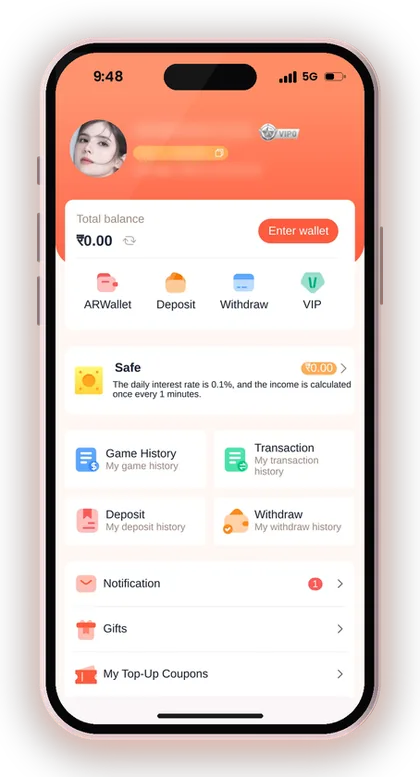
- Select the UPI-QR tile at the top of the payment methods.
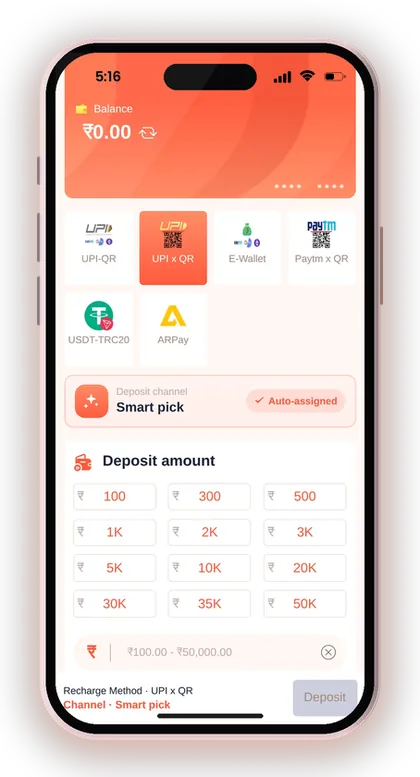
- Leave the deposit channel on Smart pick (auto-assigned).
- Type an amount between ₹100 and ₹50,000.
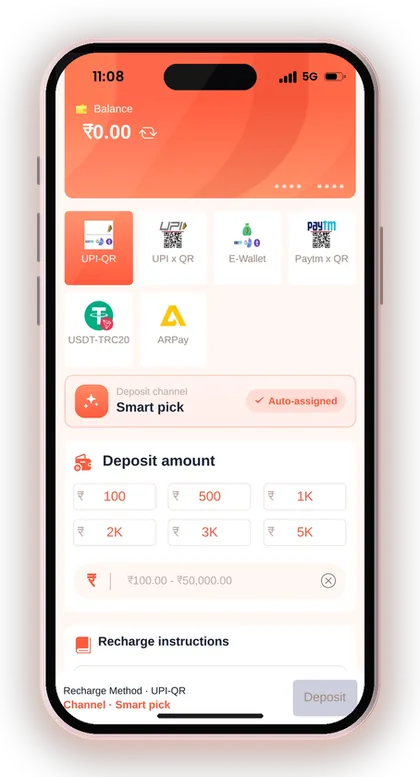
- Tap Deposit to create the order and open the QR code.
- Scan the QR with PhonePe, Google Pay, Paytm or any UPI app and pay the exact amount.
- Wait on the page, then check Deposit history to confirm the credit.
Useful Advice: Take a screenshot of the UPI success screen showing the UTR number before you close your payment app.
DM Play UPI-QR Deposit Limits
Each UPI-QR order must be at least ₹100 and no more than ₹50,000. The other UPI-based tiles on the deposit page, including UPI x QR, E-Wallet and Paytm x QR, share that same ₹100 to ₹50,000 range, so switching tiles will not get you a higher limit.
Some UPI tiles show quick-pick buttons such as 10K, 20K or 50K. These only fill in the amount box faster. Typing your own figure works just as well, and it is the better habit if you want to stick to a fixed playing budget.
| UPI Tile | Minimum | Maximum |
|---|---|---|
| UPI-QR | ₹100 | ₹50,000 |
| UPI x QR | ₹100 | ₹50,000 |
| E-Wallet | ₹100 | ₹50,000 |
| Paytm x QR | ₹100 | ₹50,000 |
What If You Want To Add More Than The Maximum?
Split it into separate orders. If you plan to add ₹80,000, make one order for ₹50,000 and a second one for ₹30,000, and wait for the first to show in Deposit history before you create the next.
Creating two orders at once and paying them back to back is how mix-ups start, especially if the amounts are close. Your bank's own daily UPI limit can also stop a large payment. Check that limit in your banking app before you plan a big deposit.
Is The ₹100 Minimum The Right Starting Amount?
For a first deposit, a small amount is the sensible choice. Adding ₹100 or ₹200 tests the whole process, from QR scan to credit, without much at risk if something goes wrong.
Once a single deposit has been credited and you understand how it shows up in Deposit history, larger amounts can be considered. Base that decision on a budget whose loss you can bear, not on a bonus banner. Lottery and casino games depend on luck, and depositing more does nothing to change this.
Rules That Decide Whether Your UPI Deposit Gets Credited
Three rules on the recharge instructions decide almost every deposit problem: pay the exact order amount, pay before the timer ends, and never cancel the order after paying. Break any one of them and the money may not reach your balance.
The platform clearly says it takes no responsibility when a wrong amount is transferred. So it pays to go through these rules carefully once instead of finding them out through a loss.
Why Must The Amount Match The Order Exactly?
The system matches your payment to your order using the amount. If you create a ₹500 order and send ₹501 or ₹450, the payment cannot be matched, and the money may not be credited at all.
This catches people who round numbers or edit the amount inside their UPI app. When the QR fills in the amount for you, leave it alone. If you entered it by hand, compare it digit by digit with the order before you enter your UPI PIN.
What Happens When The Deposit Timer Runs Out?
Once the transfer time is up, the order is closed, and you need to fill out the deposit form again. A payment made after expiry has no live order to match against.
Say you create a ₹1,000 order, then get a phone call and pay five minutes later. That payment can go into limbo. If the countdown is nearly over and you have not paid, let the order expire and create a new one rather than racing the clock.
Can You Cancel A Deposit Order After Paying?
No. The guidelines clearly caution against cancelling the deposit order after paying. A cancellation removes the exact order your payment needs to be matched with, so a credit that is merely late may become one that is lost.
Impatience is the usual cause. UPI sometimes takes a little longer to confirm, and players panic and tap cancel. If you have paid, keep the order open, keep your UTR screenshot, and check Deposit history before doing anything else.
Useful Advice: Pay from the QR screen within a minute of creating the order; the less time you leave, the fewer timer problems you will have.
How To Check Your DM Play Recharge In Deposit History
Deposit history shows every order you have created and whether it went through. Open it from the link on the deposit page itself, or from My deposit history on the Account page.
Check it after every DM Play recharge by UPI, even when your balance looks right. It confirms which order the money landed against, and that record is what you will need if you ever have to raise a complaint.
Your UPI Payment Succeeded But The Balance Did Not Update
Wait for a few minutes and then refresh Deposit history before taking any other step. For example, you may have paid ₹500 by UPI and see the debit in your bank, but your balance has not moved. Often this just means the order is still being matched.
If it stays uncredited, contact support with your order details, the exact amount, the time of payment and your UTR screenshot. Do not create a second order for the same money, and never send the payment again hoping one of them will work.
Where To Get Help With A Missing Deposit
Use Customer Service inside the Account page, the only channel you should trust for money problems. The DM Play customer care page explains how to reach the support team and what details to keep ready.
Be careful with people who message you first claiming to be support. The app's own security notice warns against sharing OTPs or paying unsolicited contacts. Real support never needs your UPI PIN or an OTP to trace a deposit.
Useful Advice: Keep the UTR number, the order amount and the time in one note on your phone until the credit appears.
UPI-QR Vs USDT Vs ARPay: Which Deposit Option Suits You?
For most Indian players, UPI-QR is the simplest choice: rupees from your bank, any UPI app, and a ₹100 minimum. The deposit page lists six ways to recharge, and the other two non-UPI options, USDT and ARPay, suit narrower needs.
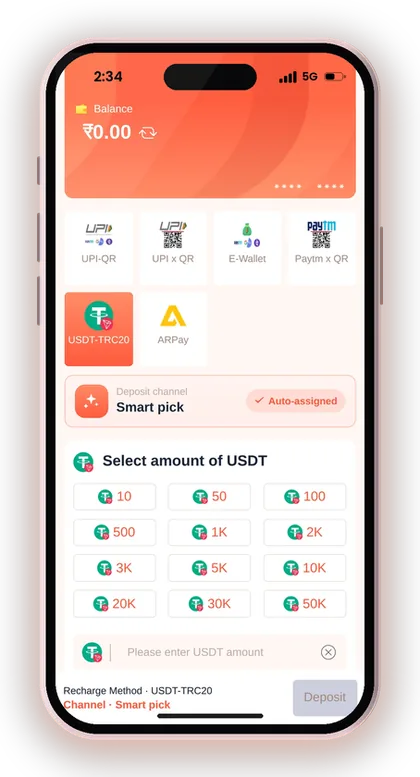
USDT uses the TRC network and suits players who already hold crypto and understand wallet addresses. Check the USDT tile for the current minimum. ARPay works through a separate AR Wallet you must activate first. It uses a digital currency called ARB and is described as completing a recharge in about 5 seconds.
| Option | Best For | What To Watch |
|---|---|---|
| UPI (UPI-QR and other UPI tiles) | Everyday rupee deposits from ₹100 | Exact amount, timer, ₹50,000 per order |
| USDT | Players already holding USDT on TRC | Correct network and address; check the tile minimum |
| ARPay | Players willing to set up AR Wallet | Wallet must be activated before use |
Useful Advice: Stick to UPI-QR for your first few deposits; switch only when you clearly understand how the other method works.
Common UPI-QR Deposit Mistakes New Players Make
Almost every stuck deposit can be traced to one of a few common habits. Once you know them, each is simple to avoid.
The list below covers the mistakes seen most often with UPI QR payments on gaming apps, including on the DM Play App. Read it before your first deposit, not after.
- Changing the amount inside the UPI app so it no longer matches the order
- Paying an old QR code saved as a screenshot after its order has expired
- Cancelling the order because the credit is taking a few minutes
- Creating several orders at once and paying the wrong one
- Sending a second payment for the same order to make it work faster
- Sharing an OTP or UPI PIN with someone claiming to be support
- Depositing more than planned because a quick-pick button was tapped by mistake
Useful Advice: Treat every QR code as single-use; scan it once, for its own order, and never reuse it.
After Your Deposit: Bonuses, Withdrawals And Safe Play
Once your balance updates, it is ready for games like Win Go, K3, 5D and the casino lobby. Before you play, look at the Activity tab. Offers such as the First Deposit Bonus are tied to your early deposits, and the DM Play bonus offers page explains what each one needs.
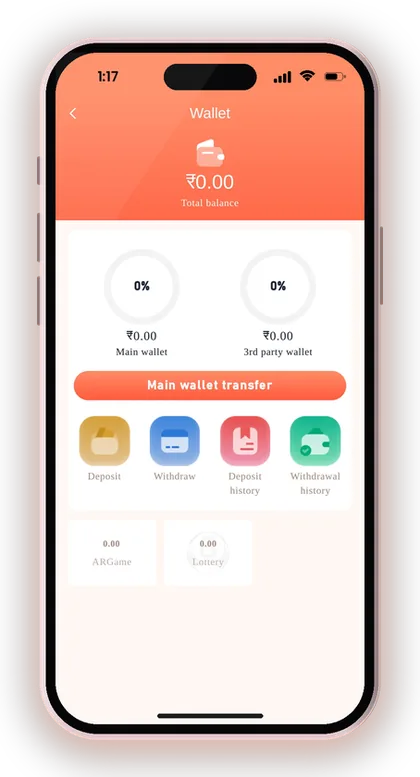
Plan how money comes back out too. Set up your withdrawal account early. The name on your first account gets locked, so enter it carefully. The DM Play bank withdrawal steps cover that part in full.
Is There A DM Play Hack For Deposits Or Results?
No. There is no such thing as a DM Play hack, and any app or Telegram group that sells one is a scam. Some of them ask you to deposit through their own QR codes, and that money never reaches your account.
Only deposit from the deposit page inside your logged-in account. Game results are random, so nobody can sell you a way to predict them. A person offering doubled deposits or guaranteed wins is after your money or your login details.
How Much Should You Deposit At Once?
Deposit only what you have set aside as your playing budget for that session, money you can lose without it hurting your bills. Small, planned deposits are easier to track in Deposit history than one large sum.
Only players who are 18 or older are allowed on the platform, which also cautions that gambling can become addictive. If you catch yourself depositing again right after losing, call it a day. Trying to win back losses with another UPI payment is the costliest habit in real-money gaming.
Useful Advice: More how-to pieces on payments and account settings are on the DM Play blog, and the full list of payment options is on the DM Play deposit methods page.
Doubts Cleared Here
What is the minimum UPI-QR deposit on DM Play?
The minimum is ₹100 per order and the maximum is ₹50,000. The other UPI tiles on the deposit page use the same range.
Which UPI apps can I use to scan the QR code?
Any UPI app that scans QR codes works, such as PhonePe, Google Pay or Paytm. Make sure your linked bank account has enough balance before you create the order.
I paid but my balance did not update. What should I do?
Wait a few minutes and check Deposit history again. Please don't cancel the order or pay again. If your balance is still unchanged, contact Customer Service from the Account page. Share the amount, the payment time and a screenshot showing the UTR.
What happens if I pay a different amount from my order?
The payment can't be linked to the order, so it might not get credited. Since the platform says it bears no responsibility for transfers of a wrong amount, always pay the exact figure.
Can I choose the deposit channel myself?
UPI-QR uses Smart pick, which assigns the channel automatically. You only choose the tile and the amount.
Do I need an invite code before I can deposit?
Yes. You need an account first, and the Register form requires an invite code. Enter 216651031605 when you sign up, then log in to reach the deposit page.
Can I deposit more than ₹50,000 in one go?
Not in a single UPI-QR order. Split the amount into separate orders and wait for each to show in Deposit history before creating the next. Your bank's daily UPI limit also applies.
You May Also Like
DM Play deposit steps for UPI, USDT and ARPay, with the ₹100 minimum, ₹50,000 UPI limit, exact-amount rules and what to do if money is not credited.

DM Play bonus offers for Indian players: new member package, 2% first deposit refund, invitation bonus, Super Jackpot, lucky wheel, gift codes and rules.
Find DM Play customer care under the Account tab, see what details to share for deposit or withdrawal issues, and how to avoid fake contacts.
DM Play bank withdrawal step by step: bind your bank account with IFSC, clear the bet requirement, ₹110 minimum, 3 requests a day and the 00:00-23:55 window.
Ready To Play On DM Play?
Register on DM Play in a minute and explore the games and offers.