
DM Play Withdrawal: How To Withdraw Money To UPI, Bank Or USDT
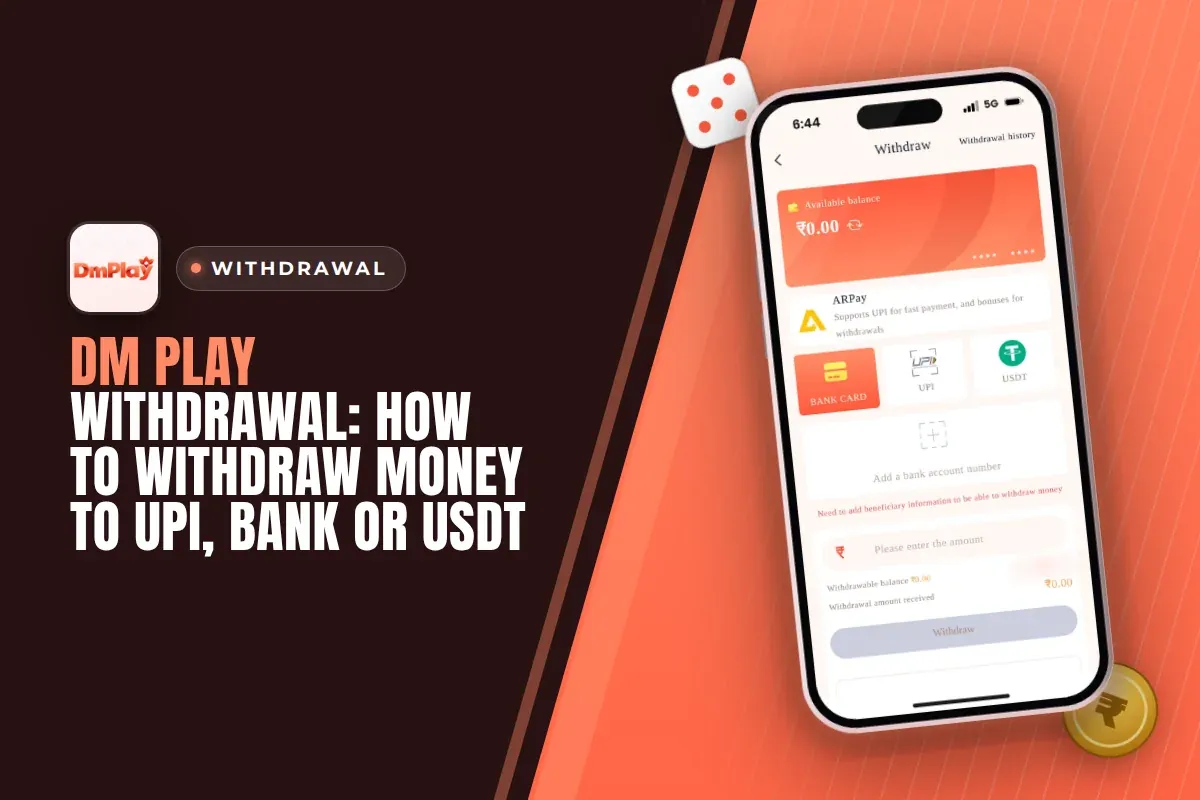
A DM Play withdrawal moves money from your main balance to UPI, a bank account, a USDT wallet or ARPay. Open Account, tap Withdraw, choose a method, enter an amount between ₹110 and the method's maximum, and confirm with your login password. You can do this between 00:00 and 23:55, up to three times a day.
The steps are simple. What holds most people up is the stuff around them: a bet requirement that has not reached zero, a typo in the IFSC code, or a name on the bank account that does not match the locked name in the app. Get these right the first time and later withdrawals take a few taps.
This page covers every method, the actual limits, the details each screen asks you to enter, and solutions to the issues beginners face most.
- Minimum Withdrawal
- ₹110 (UPI and bank)
- UPI Maximum
- ₹50,000 per request
- Bank Card Maximum
- ₹10,000,000 per request
- Withdrawals Per Day
- 3
- Withdrawal Hours
- 00:00 to 23:55
- Payment Methods
- UPI, Bank, USDT, ARPay
Quick Menu
How To Withdraw Money On DM Play?
Open Account on DM Play, tap Withdraw, select UPI, BANK CARD, USDT or ARPay, enter the amount and approve it with your login password. Funds are deducted from your main balance. Each request is then listed in Withdrawal history, so you can keep an eye on its status.
The first time you use a method, the app asks you to add your account details before it lets you withdraw. You only do this once per method. It is also where most new players make the mistake that costs them days later, so slow down and check every field.
You need an active account to start. Sign in through the DM Play login page with your phone number or email. If you have not signed up yet, registration requires invite code 216651031605 in the Invite Code field. You cannot register without it.
- Log in and tap Account at the bottom of the screen.
- Tap Withdraw. Make sure the main balance shown is the money you want to take out.
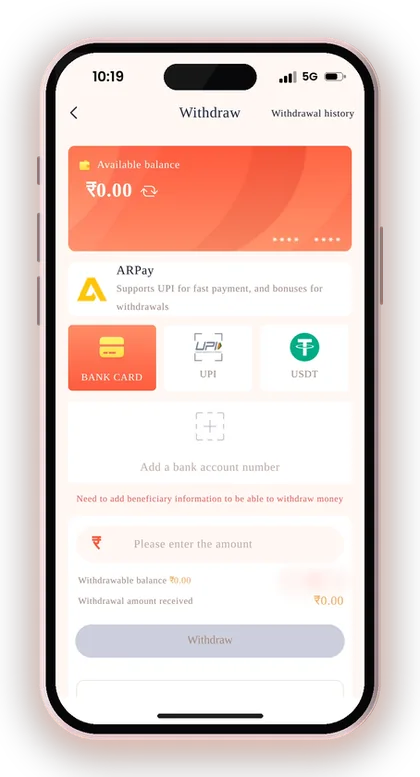
- Choose a method tab: BANK CARD, UPI, USDT or ARPay.
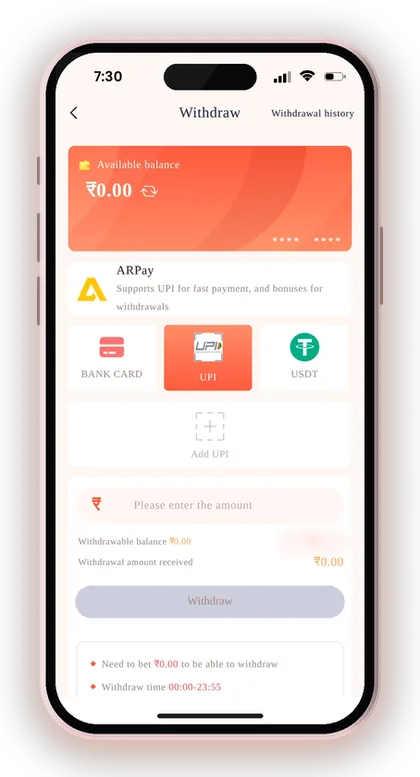
- If it is your first time, tap Add a bank account number, Add UPI or Add USDT address and save your details.
- Check that your remaining bet requirement shows zero. Until it does, the app will not let you withdraw.
- Enter an amount within the range shown under the Withdraw button.
- Enter your login password and submit the request.
- Open Withdrawal history to follow the request until it shows as completed.
Useful Advice: Take a screenshot of your request right after you submit it. The time and amount make it much easier for support to trace it if anything goes wrong.
DM Play Withdrawal Limit, Hours And Daily Count
The minimum withdrawal on DM Play is ₹110 for UPI and bank card, and ₹1,030 for USDT. UPI allows up to ₹50,000 per request. Bank card and USDT go up to ₹10,000,000. Every method is open from 00:00 to 23:55.
The withdraw screen also shows how many requests you have left for the day. It starts at three. This counter matters more than the rupee limits for most players, because a rushed or wrong request uses up a slot you cannot get back that day.
These limits are only for withdrawals. Deposit ranges are different and are listed on the UPI deposit page, so do not assume the same numbers apply both ways.
| Method | Minimum | Maximum | Hours | Requests Per Day |
|---|---|---|---|---|
| Bank Card | ₹110 | ₹10,000,000 | 00:00 to 23:55 | 3 |
| UPI | ₹110 | ₹50,000 | 00:00 to 23:55 | 3 |
| USDT | ₹1,030 | ₹10,000,000 | 00:00 to 23:55 | 3 |
| ARPay | Check AR Pay transaction rules | Check AR Pay transaction rules | Check in the app | Check in the app |
How To Plan Around Three Withdrawals A Day
Three requests a day is plenty if you plan, and tight if you do not. Say your balance reaches ₹1,20,000 and you want it all through UPI. At ₹50,000 per request, that needs three requests and uses up the whole day's allowance.
A single bank card request covers the same amount in one go, because the bank card maximum is far higher. For large amounts, use the bank card. Keep UPI for smaller, regular withdrawals.
What The 00:00 To 23:55 Window Means
You can submit requests almost all day. The only gap is the five minutes from 23:55 to midnight. If you try to withdraw at 23:57, the button will not go through, and you have to wait until 00:00.
Many players hit this late at night after a session and think something is broken. Nothing is wrong. Wait a few minutes, then check the remaining count on the withdraw screen before you submit, so you know how many requests you have left for the new day.
Useful Advice: Before you type an amount, read the range printed under the Withdraw button on that method's tab. It is always the current limit for that method.
How To Add A Bank Account For DM Play Withdrawals
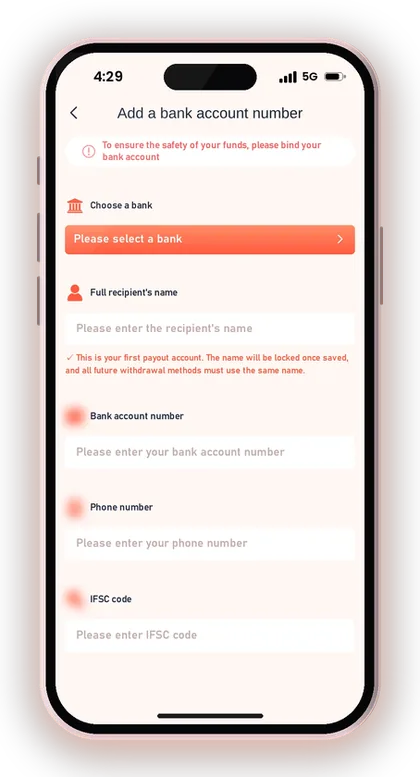
Open the withdraw page, switch to the BANK CARD tab and press Add a bank account number. These beneficiary details let the app send money to your bank. You fill them in only once, and every bank withdrawal after that uses the saved information.
There are five fields. Each has to match your bank's records exactly, because the transfer goes to whatever you type here.
- Choose a bank: pick your bank from the list.
- Full recipient's name: type the account holder's name exactly as the bank records show it.
- Bank account number: type it carefully, digit by digit.
- Phone number: use the mobile number linked to your account.
- IFSC code: copy it from your cheque book or banking app.
- Tap Save, then go back to the Withdraw tab.
Why The Recipient Name Gets Locked
Your first saved account sets the name for every future withdrawal method. The app locks the full recipient's name when you save, and any UPI ID or bank account you add later must carry the same name.
The usual mistake is a nickname or a short form, like "Raju" instead of "Rajesh Kumar". That name may not match your bank or UPI records, and you cannot just edit it later. Type your full name exactly as your passbook or bank app shows it.
Common Bank Detail Mistakes To Avoid
Most failed bank withdrawals come from three errors: one wrong digit in the account number, an IFSC code from a different branch, or someone else's account. Take the IFSC code from your cheque book or bank app, not from memory.
The withdraw screen warns that the platform takes no responsibility for losses caused by wrong bank information. If you have already saved incorrect details, do not keep trying new withdrawals. Contact customer service and ask them to correct it first.
Useful Advice: After saving, compare the last four digits of the account number on screen with your passbook before your first withdrawal.
DM Play UPI Withdrawal: Binding Your UPI ID
A DM Play UPI withdrawal sends money straight to your UPI ID, which you can use in PhonePe, Google Pay, Paytm or any other UPI app. Open the UPI tab, tap Add UPI, and fill in the UPI Name, Phone Number, UPI ID and Confirm UPI ID fields. Then tap Save.
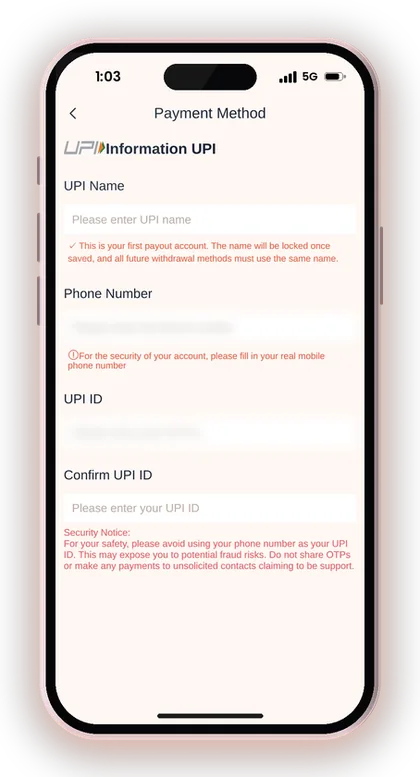
The Confirm UPI ID field is there because a single wrong letter can send money to the wrong person. Type the ID both times instead of pasting the same mistake twice. The UPI Name must also match the name locked on your first account.
Most players use UPI for small and medium withdrawals. The ₹110 minimum is low and the ₹50,000 per-request cap covers normal play. Above that, the bank card tab is the better choice.
Should Your Phone Number Be Your UPI ID?
No, we advise against it. The app itself cautions users not to set their mobile number as the UPI ID, since this raises the risk of fraud. A UPI ID built from your number lets others connect that number with your transactions and target you.
Most UPI apps let you create a different ID. Do that before you bind UPI here. The app also asks for your real mobile number in the Phone Number field, which is separate from the ID and is used for account security.
UPI Or Bank Card: Which Should You Pick?
Use UPI for regular withdrawals of up to ₹50,000. Use the bank card when you need to move a larger amount in one request. Both have the same ₹110 minimum and the same hours, so the size of the amount is what decides it.
Many players add both. If one channel is slow on a given day, you can switch without stopping to enter new details. Just keep the same locked name on both, or the second one will be rejected.
Useful Advice: Send ₹1 to your UPI ID from a friend's phone before binding it. If the name that shows up matches your locked name, the ID is safe to use.
Withdrawing To A USDT Wallet On The TRC Network
To withdraw in USDT, open the USDT tab, tap Add USDT address, choose the TRC main network, paste your wallet address, add a short alias and tap Save. After that, choose the amount of USDT and submit with your login password.
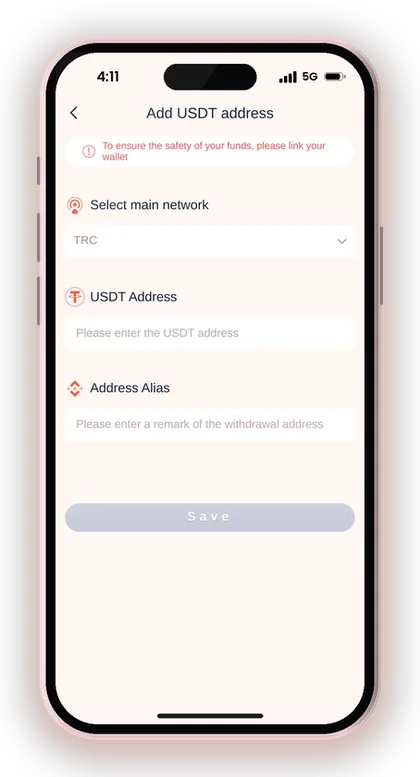
The minimum here is ₹1,030 and the maximum is ₹10,000,000. That makes USDT a poor fit for small amounts. It suits players who already hold a crypto wallet and want to move larger sums without going through bank limits.
The USDT tab also has a Contact customer service link. Use it if adding the address fails, instead of trying different networks yourself.
What Three Network Confirmations Mean For Timing
Once your withdrawal is submitted, the blockchain main network must confirm the transfer three times before the funds land in your wallet. These confirmations take place on the blockchain and not within the app. So even after the platform has approved your request, you may still have to wait a little.
When the app marks the request as complete but nothing has arrived in your wallet, let the confirmations finish first. After that, look up the transaction on a TRC block explorer before approaching anyone. Most USDT withdrawals that seem lost are simply still being confirmed.
Why A Wrong Network Address Is Costly
Crypto transfers cannot be reversed. If you paste an address from a different network, or an exchange deposit address that does not accept TRC, the coins may be lost for good. The app only lists TRC, so your receiving address must be a TRC USDT address.
Take the address directly from the receive screen of your wallet. After pasting it, compare its first four and last four characters. Saving it under a clear alias such as "My TRC wallet" also stops you from choosing an outdated address later.
Useful Advice: Never type a USDT address by hand. Always paste it, then compare the start and end characters with your wallet app.
How ARPay Withdrawals Work With AR Wallet
With ARPay, you can move your DM Play balance to AR Wallet, an outside payment service built on a digital currency named ARB. You must first tap Activate on the ARPay tab. Until then, the screen says your AR wallet is not yet activated.
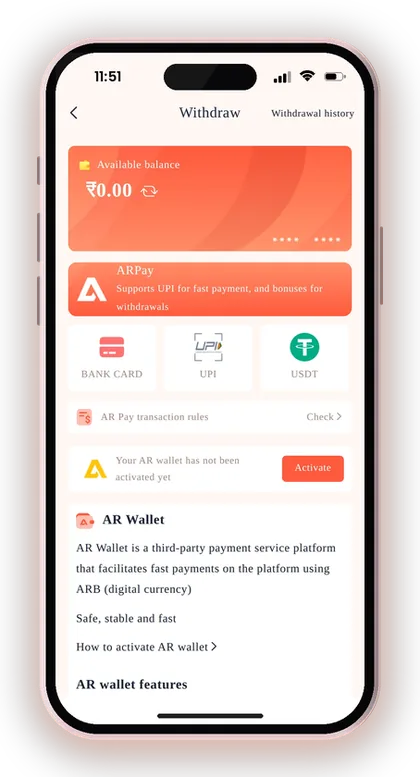
Once active, the withdrawal goes to AR Wallet instead of your bank. When you want rupees, you sell your ARB through UPI inside AR Wallet. The platform says this route can earn additional rewards on withdrawals, and that it helps you avoid bank limits and bank transaction problems while you play.
The trade-off is an extra step and one more app holding your money. If your bank often flags gaming transactions, ARPay can help. If you just want money in your account with the fewest steps, a direct UPI or bank withdrawal is simpler.
Before your first ARPay withdrawal, tap Check next to AR Pay transaction rules. That is where the current terms for selling ARB and the rewards are listed. Read them before you move a large amount.
Useful Advice: Try ARPay with a small amount first and complete one full sale of ARB to UPI before you rely on it for bigger withdrawals.
Why Is My DM Play Withdrawal Not Working?
Most blocked or delayed withdrawals come from four causes: a bet requirement that has not reached zero, money sitting in the wrong wallet, wrong account details, or a request that is still being processed. Each one has a clear fix, and none of them needs a fresh request every five minutes.
Spamming the Withdraw button can use up your three daily requests without fixing anything. Find the cause first, then submit once.
Your Remaining Bet Requirement Is Not Zero
The app's own rules say your total bet requirement must reach zero before you can withdraw. If it still shows an amount, you have to place that much in valid bets first. Deposits and some bonus credits usually add to this figure.
Say you deposit ₹500 and play only ₹300 before trying to withdraw. The remaining ₹200 blocks the request. Check the figure on the withdraw screen, finish the remaining bets at a stake you are comfortable with, then try again.
Your Money Is In The 3rd Party Wallet
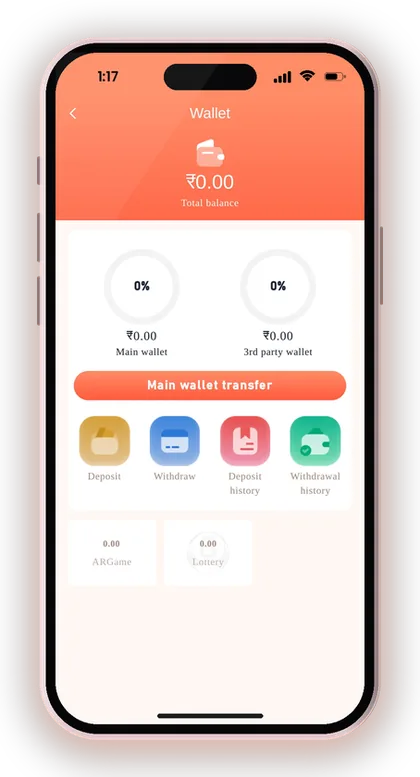
The Wallet page splits your funds between a main wallet and a 3rd party wallet. When you play some partner games, part of your balance can remain in that game's separate wallet. Withdrawals draw only from the main wallet, so that part won't be shown as available.
Open Wallet and tap Main wallet transfer to bring everything back into the main wallet. Then reopen the withdraw screen. This one step fixes a lot of "my balance is less than it should be" worries.
Request Submitted But Money Not Received
Check Withdrawal history under Account first. If the status is still pending, the request is being processed. If it says completed, look at your bank or UPI statement, because credits sometimes appear under a name you do not recognise.
If nothing has arrived after a reasonable wait, contact DM Play customer service with the time, amount and method of the request. Do not cancel and resubmit. That uses up another daily slot and can make the trail harder to follow.
Wrong Bank Or UPI Details Saved
If a withdrawal fails because of a wrong account number, IFSC code or UPI ID, the fix is to correct the saved details, not to keep retrying. The app tells you to contact customer service when your registered bank information is wrong.
Contact support with the right details and your user ID. The recipient name gets locked after it is first saved, so only support can correct a mistake in it. Never create a second account as a workaround.
How Bonuses And Rewards Affect Your Withdrawal
The app pays most rewards straight into your wallet balance, so once any betting requirement is cleared you can withdraw them like winnings. Invitation rewards arrive in the wallet balance within 10 minutes of claiming. Agent commission is worked out every morning from 01:00 and then added to your wallet.
Each offer has its own conditions, and some of them affect when your balance becomes free to withdraw. Read the offer rules on the DM Play bonus offers page before you claim anything, especially right before you plan to withdraw.
Can You Withdraw Bonus Money Right Away?
Once a bonus is in your wallet balance, it counts toward the amount you can withdraw. You still need the bet requirement at zero and the right wallet selected. A bonus claimed just before withdrawing can add to the bets you need to finish first.
If you plan to withdraw today, claim new bonuses after the withdrawal rather than before. That way a fresh condition does not hold back money you have already earned.
Rules That Can Freeze A Balance
Promotion misuse can lead to the account and its balance being frozen or closed, according to the app's terms. One bonus is allowed per mobile number, payment method and IP address. Using multiple accounts on the same phone or bank account gets detected.
Betting both sides of the same round is also not allowed. That means Big and Small together, or Red and Green together. Some players do this to clear bet requirements quickly, but it breaks the rules and puts the withdrawal itself at risk.
Useful Advice: Use one account, one phone number and one set of payment details. It is the simplest way to make sure your withdrawals never get held for a review.
Keeping Your DM Play Withdrawals Safe
The safest withdrawal is one you make yourself, from the real app, to an account in your own name. Use only the DM Play official website or the DM Play app downloaded from it. Copy sites can look the same and steal your login password, which is exactly what anyone needs to withdraw your balance.
A DM Play hack does not exist. Any app or Telegram group selling a hack or predictor for Win Go results is a scam. Outcomes are random, and such sellers are after your deposit or login details. A genuine support agent will never ask for your OTP or ask you to pay to release a withdrawal.
- Account details saved in your own full name
- Phone number not used as your UPI ID
- Login password known only to you
- App opened only from the official website
- No OTP shared with anyone claiming to be support
Protect Your Login Password
Since each withdrawal requires your login password, guard it as carefully as your UPI PIN. To change it, open Account, tap the Settings icon, select Login Password, type the current one, create a strong new password and save.
Lost your password? Use the Forgot password option on the login page, or contact customer support. Do not share it with any agent or referrer offering to look after your account, because whoever has it can take out your funds.
Withdraw Winnings Before They Go Back Into Play
Fast colour rounds make it easy to bet a winning balance straight back into play. Decide on your playing budget before you start. Once your balance goes above it by an amount you are happy with, withdraw the extra.
This is about handling your money sensibly, not about winning. Each round is decided by chance, and losing is part of playing for real money. Only users above 18 may play. When it no longer feels enjoyable, pause and decide a limit for yourself.
Useful Advice: If someone messages you saying your withdrawal is stuck and asks for a fee, block them and check Withdrawal history inside the app yourself.
Doubts Cleared Here
What is the minimum DM Play withdrawal?
The minimum is ₹110 for UPI and bank card withdrawals. USDT needs at least ₹1,030. Always check the range shown under the Withdraw button, because it is the current limit for that method.
What is the daily withdrawal limit in terms of requests?
You begin with three requests a day on the withdraw screen, and the screen displays how many are left. Group large amounts together so that small requests don't exhaust all three.
What is the maximum UPI withdrawal on DM Play?
UPI allows up to ₹50,000 per request. For larger amounts, use a bank card withdrawal, which goes up to ₹10,000,000 per request.
At what time can I withdraw money?
Withdrawals can be made from 00:00 to 23:55. Any request made between 23:55 and midnight will fail, so wait until 00:00 and try once more.
Why does the app say I cannot withdraw even though I have a balance?
Usually your remaining bet requirement is not yet zero, or part of your money is in the 3rd party wallet. Finish the remaining bets, use Main wallet transfer on the Wallet page, and then try again.
Is it possible to edit the holder name on my withdrawal account?
The recipient name is locked when you save your first account, and all later methods must use the same name. If it was entered wrongly, contact customer service to have it corrected.
How long does a USDT withdrawal take to reach my wallet?
Once the platform has processed the transfer, the blockchain main network has to confirm it three times before it arrives in your wallet. Meanwhile, you can follow its status on a TRC block explorer.
Is there a DM Play hack to win more and withdraw more?
No. Anyone selling a hack or predictor, whether an app or a group, is cheating you. Outcomes are decided by chance, and such sellers just want your money or your login details.
You May Also Like
DM Play deposit steps for UPI, USDT and ARPay, with the ₹100 minimum, ₹50,000 UPI limit, exact-amount rules and what to do if money is not credited.
Find DM Play customer care under the Account tab, see what details to share for deposit or withdrawal issues, and how to avoid fake contacts.
DM Play Login for players in India works with your +91 mobile number or email. Learn how to reset a forgotten password and fix sign-in issues.

DM Play bonus offers for Indian players: new member package, 2% first deposit refund, invitation bonus, Super Jackpot, lucky wheel, gift codes and rules.
Ready To Play On DM Play?
Register on DM Play in a minute and explore the games and offers.