
DM Play Deposit: How To Add Money By UPI, USDT And ARPay
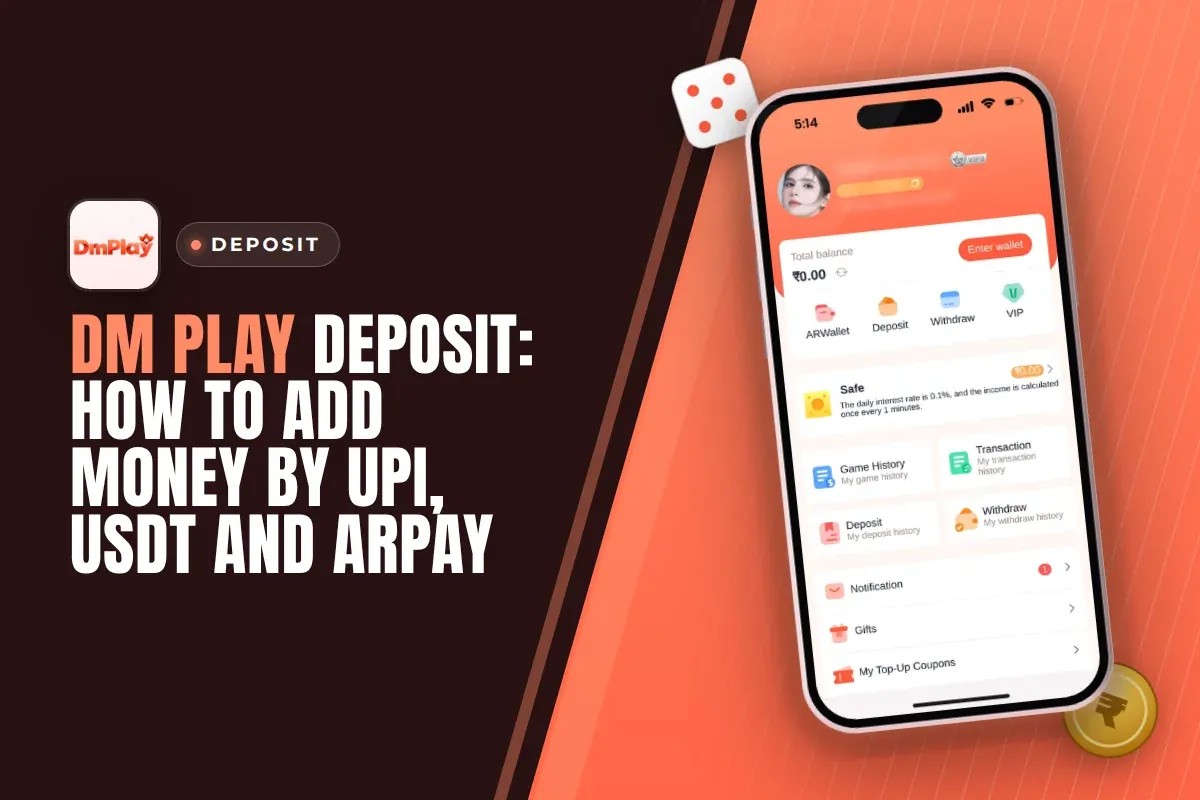
A DM Play deposit takes about a minute. Open Account, tap Deposit, pick UPI, USDT or ARPay, enter the amount and pay. UPI deposits start at ₹100 and go up to ₹50,000 per order. The money reaches your balance once your payment matches the order you created.
Three small slips cause most deposit failures: paying an amount that differs from the order, paying once the timer has expired, or cancelling the order after the bank has already debited the money. Here you will find the exact steps, the limits for every method, how USDT and ARPay compare with UPI, and what to do if your balance stays unchanged.
An account must exist before you can add money. Registering on DMplay needs an invite code, so have 216651031605 handy before you begin.
- Minimum Deposit
- ₹100 by UPI
- Maximum UPI Deposit
- ₹50,000 per order
- Payment Methods
- UPI, USDT, ARPay
- USDT Network
- TRC20 only
- ARPay Recharge Time
- About 5 seconds
- Invite Code
- 216651031605
Quick Menu
How To Deposit Money On DM Play?
To deposit on DM Play, open Account, tap Deposit, pick a method, key in the amount and complete the payment through your UPI app or wallet. A Deposit button also sits on the Wallet page and at the top of each lottery game screen, so you can top up in the middle of a Win Go round without leaving it.
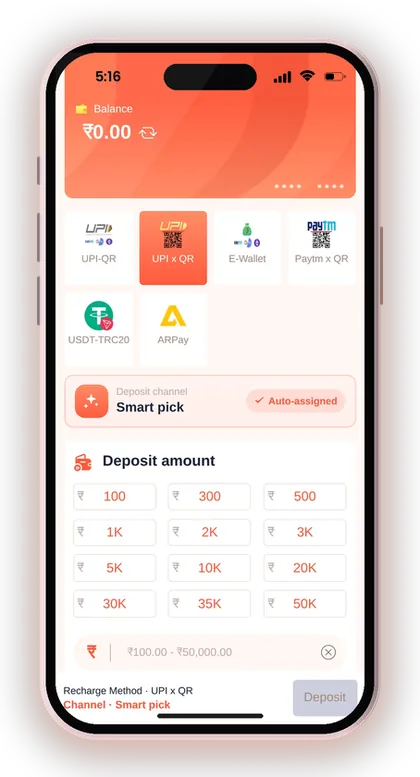
The Deposit page shows six options. Four of them are UPI, one is USDT on the TRC20 network and one is ARPay. For most players in India, UPI is the quickest route because you pay from PhonePe, Google Pay or Paytm, which are already on your phone.
You do not pick a payment gateway yourself. The channel under each method is auto-assigned, which means the app sends your order to whichever channel is working. If one UPI tile keeps failing, go back and try another UPI tile. That small switch fixes most stuck orders.
- Sign in using your registered mobile number or email, along with your password.
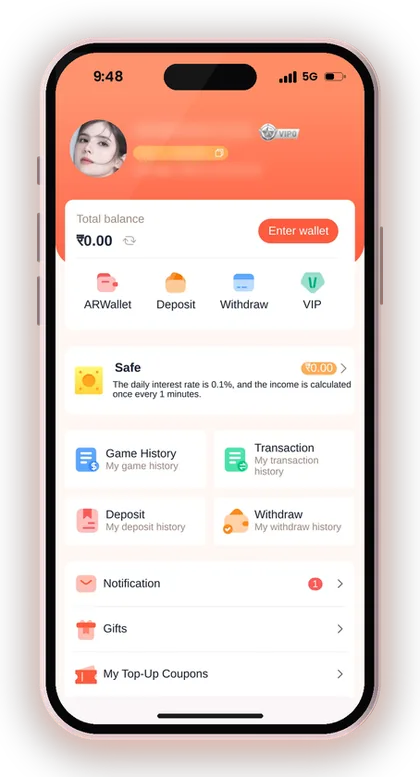
- Tap Account in the bottom menu, then tap Deposit.
- Choose UPI, USDT or ARPay from the method tiles.
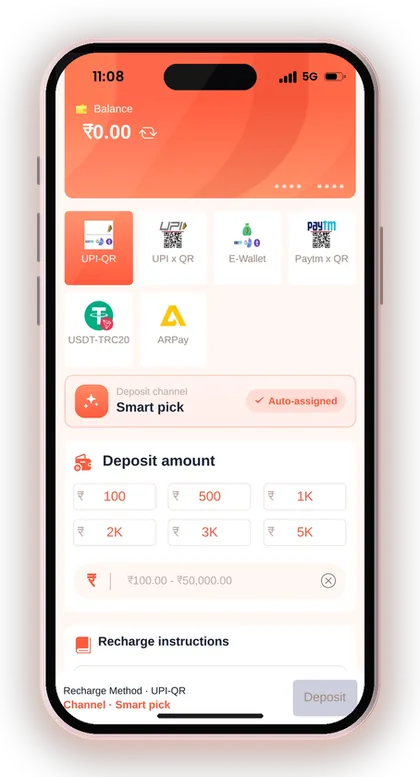
- Type the amount, or tap one of the quick amount buttons.
- Tap Deposit to create your order.
- Pay the exact order amount in your UPI app before the timer ends.
- Return to the app and open Deposit history to check the status.
Useful Advice: Read the recharge instructions under the Deposit button once, because those few lines decide whether your money gets credited.
DM Play Deposit Methods: UPI vs USDT vs ARPay
DM Play accepts three ways to add money: UPI, USDT and ARPay. The four rupee tiles on the Deposit page are all UPI. It makes no difference whether you pay with PhonePe, Google Pay or Paytm, because each one sends a normal UPI payment to a QR code.
Pick the method that matches where your money already is. If it is in a bank account, use UPI. USDT only makes sense if you already hold USDT in a crypto wallet. Buying crypto just to make a deposit adds an extra step and a price gap. ARPay needs a separate AR Wallet that you activate first.
| Method | Best For | Minimum | Main Thing To Watch |
|---|---|---|---|
| UPI | Everyday deposits from a bank account | ₹100 | Pay the exact order amount before the timer ends |
| USDT (TRC20) | Players who already hold USDT | 10 USDT on the tile (check before sending) | Send only USDT on TRC20 and paste the hash ID |
| ARPay | Players with an activated AR Wallet | Check the ARPay page | Activate AR Wallet first |
UPI Or USDT: Which Is Better For Indian Players?
UPI is the better choice for most players. The money goes straight from your bank, you scan a QR code you already know how to use, and you need no crypto account or network settings.
USDT suits players who are already trading on crypto exchanges and want to move funds they hold there. The risk is higher, though. If you send on the wrong network or to a wrong address, the money cannot be recovered. A UPI mistake can at least be traced through your bank with a UTR number.
Why Are There Four Different UPI Tiles?
Each UPI tile is a separate payment channel for the same kind of UPI payment. The app keeps several channels so that deposits keep working when one channel is slow or busy.
Many new players assume a tile can be paid only through the app whose name it carries. This is not true. Every one of these QR codes can be scanned by any UPI app. When a tile gives an error or its QR code fails to load, cancel that unpaid order and move to another tile instead of tapping the same one again and again.
Useful Advice: Stick with one UPI app for all your deposits so your bank statement stays easy to match against your Deposit history.
DM Play Recharge Limits: Minimum And Maximum Deposit
The minimum UPI deposit on DM Play is ₹100 and the maximum is ₹50,000 per order. The same range applies to all four UPI tiles. For USDT, the tile's instructions say that anything below 10 USDT will not be credited. ARPay shows its own rules on its page.
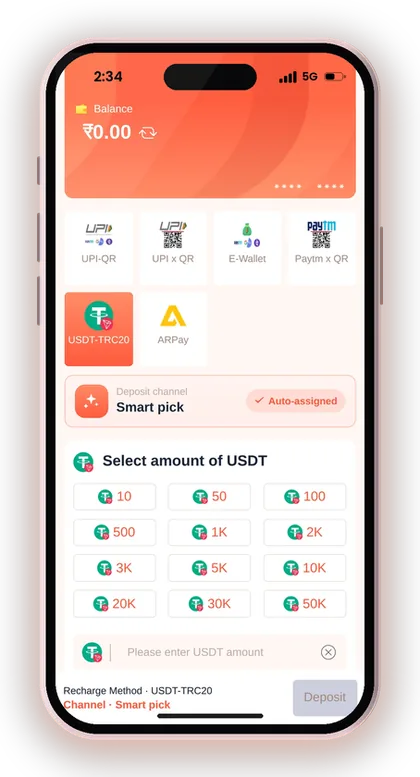
The quick amount buttons on the UPI tiles start at 10K and go up to 50K. They only save typing. You can still enter a smaller amount, from ₹100 upwards, in the deposit amount box.
To add more than ₹50,000, wait until the first order has been credited and then place a second one. Keeping two unpaid orders open together makes it very easy to pay the wrong one.
| Method | Minimum | Maximum |
|---|---|---|
| UPI (all four tiles) | ₹100 | ₹50,000 per order |
| USDT (TRC20) | 10 USDT as stated on the tile | Check the USDT tile |
| ARPay | Check the ARPay page | Check the ARPay page |
Can You Deposit Less Than The Quick Amount Buttons?
Yes. The buttons are shortcuts, not the minimum. Tap the amount box and type any figure from ₹100 to ₹50,000 instead of tapping 10K or 20K.
A common mistake is tapping a button by accident and paying a much bigger amount than planned. Before you tap Deposit, check the figure in the amount box, because that number becomes your order. You must then pay exactly that amount, not the one you had in mind.
How Much Should Your First Deposit Be?
Start small, close to the ₹100 minimum or a few hundred rupees. A small first deposit shows you how fast the channel credits your money, how the games feel with real stakes and how the withdrawal side works, without putting a big sum at risk.
Raise the amount only after you have made one full round trip of deposit, play and withdrawal. Check the DM Play withdrawal limits and steps before you deposit large sums, so that you know what you can take back out and when.
Useful Advice: Decide your deposit amount before you open the app, not while you are halfway through a losing round.
How To Make A DM Play UPI Deposit Without Errors
A DM Play UPI deposit succeeds when three conditions are met: the amount is the same as the order, the payment is made before the timer finishes, and the order stays open once you have paid. These rules are taken directly from the recharge instructions beneath the Deposit button. The platform clearly states that it takes no responsibility if the amount you transfer is incorrect.
Here is a typical case. You create a ₹500 order, the QR code opens, and you type ₹500 into PhonePe from memory instead of scanning. If you type ₹50 or ₹5,000 by mistake, the system cannot match it to your order and nothing gets credited. Scan the QR code wherever you can, and check the amount on the payment screen before you enter your UPI PIN.
- Your UPI app shows the very same figure as the order
- The payment is made before the order timer ends
- The order is not cancelled after the money is sent
- Only one unpaid order is open at a time
- The UTR or reference number is saved from your UPI app
Why Must The Amount Match To The Rupee?
The payment system finds your deposit by matching the amount against the open order. A payment of ₹499 against a ₹500 order looks like someone else's money, so it does not land in your balance.
Do not round the figure up or down, and do not add a little extra to cover charges. If you have already paid a wrong amount, do not make a second payment to fix it. Keep the UTR number from your UPI app and contact support with that reference.
What Happens When The Payment Timer Runs Out?
When the timer ends, the order closes and the instructions tell you to fill out the deposit form again. A payment made to an expired order may not be matched, so never pay a QR code that has already timed out.
The usual mistake is opening the QR code, leaving to check a bank balance, and paying ten minutes later. Have enough money in your bank before you tap Deposit, and finish the payment in one go.
Useful Advice: Take a screenshot of the successful UPI payment showing the UTR number, because support needs it if anything goes wrong.
DM Play USDT Deposit On The TRC20 Network
A DM Play USDT deposit works by sending USDT on the TRC20 network to the address the app shows, then pasting the transaction hash so the deposit can be matched. The address accepts USDT only. The app warns that other coins or assets sent there will not be recovered.
Choose your USDT amount on the USDT-TRC20 tile and tap Deposit. The next screen shows the deposit address and the network, plus a box for the transaction or hash ID. Do not close it before you have pasted the hash and tapped Complete recharge.
- Tap the USDT-TRC20 tile on the Deposit page.
- Select the amount of USDT and tap Deposit.
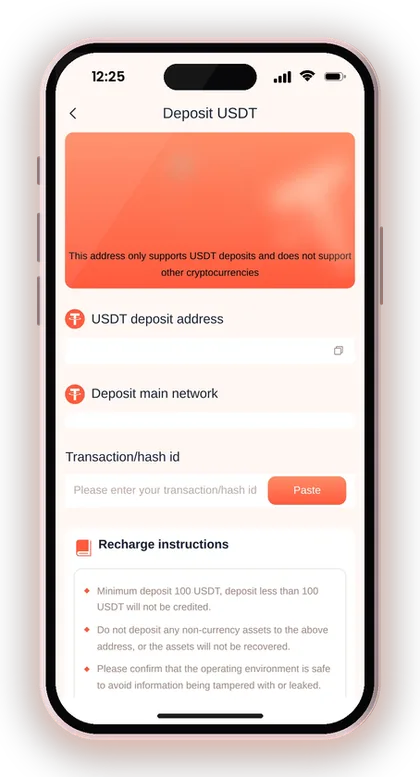
- Copy the USDT deposit address shown on screen.
- Send USDT from your wallet on the TRC20 network only.
- Copy the transaction hash from your wallet history.
- Put it in the transaction/hash ID field and tap Complete recharge.
What If You Send USDT On The Wrong Network?
USDT sent on any network other than TRC20 should be treated as lost. Exchanges often default to a different network in the withdrawal form, and that is where most crypto deposit losses come from.
Before confirming, look at the network shown in your exchange or wallet and check that it reads TRC20. Use the copy button for the address instead of typing it, then compare its first and last few characters after pasting. A small test transfer is a sensible step, provided it is higher than the tile's minimum.
Where Do You Find The Transaction Hash?
Once the transfer is sent, its transaction hash (also called TxID) shows up in your wallet or exchange history. This long mix of letters and numbers is the proof that the transfer took place on the blockchain.
Copy it, return to the USDT deposit screen, tap Paste in the hash ID box and then tap Complete recharge. Skipping this step is a common reason a USDT deposit sits unmatched even though the coins have arrived.
Useful Advice: Do your USDT deposits on a phone and network you trust, because the app itself warns against address details being tampered with or leaked.
How To Recharge Through ARPay And AR Wallet
ARPay allows you to recharge via AR Wallet, a third-party payment service built on a digital currency named ARB. According to the app, an ARPay recharge needs just about 5 seconds, which is faster than waiting for a UPI channel to confirm.
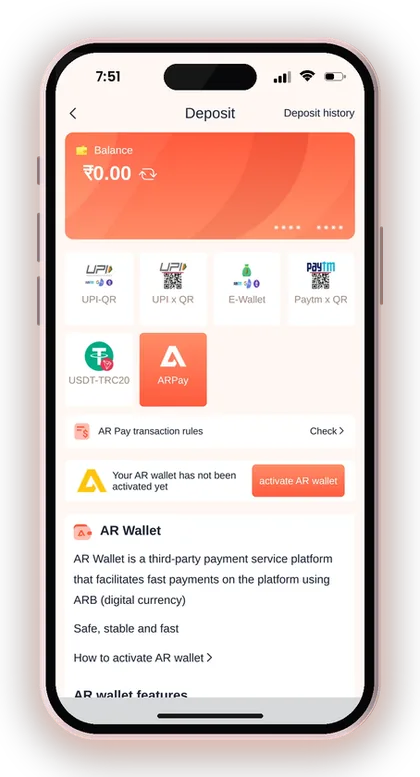
You have to activate AR Wallet before ARPay will work. The ARPay tile shows an activation button, a short guide on how to activate it and a link to the AR Pay transaction rules. Read those rules before you start, because they cover how ARB is bought and sold.
Is ARPay Worth Setting Up?
ARPay makes sense if you deposit and withdraw frequently and keep hitting bank limits or failed UPI transfers. Funds move between your balance and AR Wallet. When you want rupees, you sell ARB via UPI within the wallet, and the app says this may bring extra rewards.
If you only add ₹200 occasionally, UPI is the easier choice. ARPay brings an extra app, an extra account and an extra set of rules to manage. Consider it only after you are at ease with the way deposits work.
Useful Advice: Activate AR Wallet before the day you need it, so that a first-time setup does not hold up your deposit.
DM Play Deposit Not Credited? What To Do
If your deposit does not show, first check Deposit history for the order status. Then compare it with the payment in your UPI app or wallet. Most delays sort themselves out once the payment channel confirms, so give it a short while before you raise a complaint.
Here is a typical case. You pay ₹1,000 by UPI, your bank shows the money as debited, but your balance has not moved. Do not create a new order and pay again. Keep the first order open, note the UTR number and wait for the channel to confirm. Paying twice for one stuck order is how a ₹1,000 problem becomes a ₹2,000 problem.
- The bank or UPI app shows the payment as successful
- The paid amount matches the order amount exactly
- The order was not cancelled after paying
- The USDT hash was pasted, if you paid in USDT
- Both main and third-party wallet balances have been checked
How To Check Your Deposit History
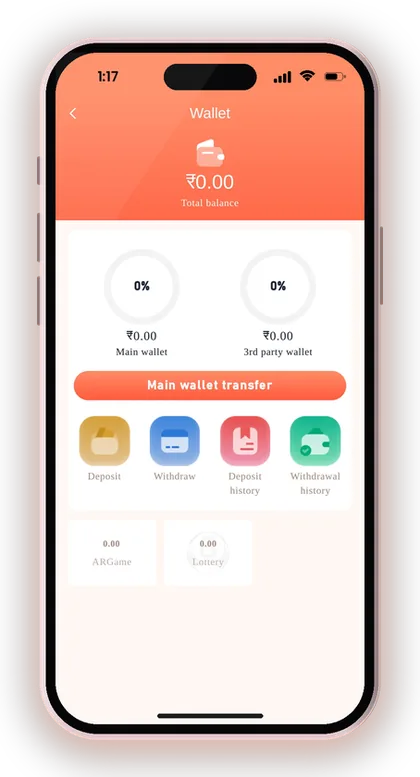
Go to Account and tap Deposit under My deposit history, or open Deposit history from the Wallet page. Every order shows up there with its amount and status, so you can see whether it is pending, completed or closed.
Match the order amount with your bank SMS or UPI app entry. If the amounts differ, the payment will not be credited automatically. That is a matter for support, not something to keep waiting on.
When Should You Contact Customer Service?
Contact support when your bank shows the money as debited but the order stays unpaid well after a normal wait, or when you paid a wrong amount. Customer Service is under Account, and DM Play customer care explains how to reach the team and what to send.
Share the order details, the amount, the payment time and the UTR number or USDT hash, all in one message. Clear details get a case resolved faster than repeated messages asking where your money is.
Balance Not Showing Inside A Slot Or Casino Game?
Your deposit goes to the main wallet. Some third-party games use a separate 3rd party wallet, so the main balance is not always the balance you see inside those games.
Open the Wallet page and check both balances before you assume a deposit is missing. Main wallet transfer moves your money between them. Many players report a missing deposit that is simply sitting in the other wallet.
Useful Advice: Raise a deposit complaint with the UTR number in your very first message, since support cannot trace a UPI payment without it.
Before Your First Deposit: Account, DM Play Invite Code And Bonus
Deposits are possible only after you create an account, and the registration form can't be submitted until an invite code is entered. Type 216651031605 into the Invite Code field when signing up. If any field leaves you unsure, the DM Play register page explains them one by one.
Plan your first deposit around the bonus rules and the withdrawal rules together. Those two decide how much of your deposit you can play with and when you can take money out.
- Type your mobile number after the +91 country code, or pick email instead.
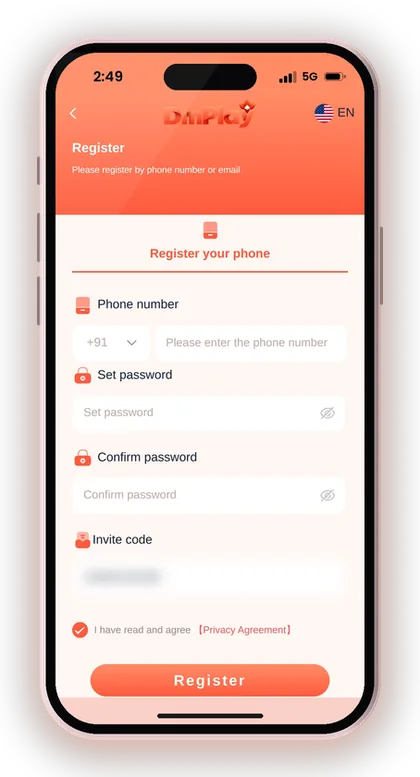
- Set a password and confirm it.
- Enter 216651031605 in the Invite Code field.
- Check the box confirming that you accept the Privacy Agreement.
- Tap Register, then log in and open Deposit.
Does Your First Deposit Get A Bonus?
Yes. A First Deposit Bonus is listed on the Activity page, along with a rule for new users: if your first deposit ends in a loss over 24 hours, the platform returns 2%, up to ₹200. New members can also earn small bonuses once their total deposits and valid bets reach set levels after 1, 7 and 15 days.
These rewards are small next to the deposit itself, so do not deposit more just to chase one. Check the current DM Play bonus offers for the latest terms before you pay.
Can You Withdraw Your Deposit Straight Away?
Not always. According to the withdrawal steps, your total bet requirement must be zero before a withdrawal is allowed. In practice, this means you must first play through the money you deposited.
New players often deposit, play two rounds and then try to withdraw, only to find the request blocked. If you might need the money back soon, deposit only what you plan to play with. Do not treat your game balance like a savings account.
Useful Advice: Set up your bank account or UPI details for withdrawals prior to your first deposit, since the name saved first stays locked for every future withdrawal method.
Safe Deposit Habits On DM Play
Only deposit through the DM Play app or the DM Play official website, using the Deposit button inside your account. The platform's own notice tells players to use the official site only and to contact support for account help. Any payment request from outside the app is a red flag.
Scammers target new depositors with fake agents on WhatsApp or Telegram, fake 'support' numbers and paid 'signal' groups. There is no DM Play Hack. Any app or person selling one is after your money, and game results are random. You can always get back to the real site from the DM Play home page.
- Pay only the QR code or address shown inside your own Deposit order
- Never share your OTP or UPI PIN with anyone claiming to be support
- Never send money to a personal UPI ID that someone gives you in a chat
- Keep a monthly playing budget and do not deposit beyond it
- Do not deposit to win back losses; take a break instead
- Only players who are at least 18 years old can join
Useful Advice: Playing for real money can lead to losing what you deposit, so add only an amount you are fine with losing, and look up the rules on real-money games in your state beforehand.
Doubts Cleared Here
What is the minimum deposit on DM Play?
The minimum UPI deposit is ₹100 and the maximum is ₹50,000 per order. For USDT, the tile's instructions say anything below 10 USDT will not be credited. Check the USDT tile before sending, in case the rule has changed.
Can I deposit with PhonePe, Google Pay or Paytm?
Yes. All four rupee tiles on the Deposit page are UPI, so any UPI app can scan the QR code. Pay the exact order amount before the timer ends.
Why is my DM Play deposit not showing in my balance?
The most common reasons are a paid amount that differs from the order, a payment made after the timer ran out, or an order cancelled after paying. Check Deposit history and keep your UTR number. If the money was debited and the order stays unpaid, contact Customer Service from the Account page.
How do I make a USDT deposit?
Tap the USDT-TRC20 tile, choose the amount and tap Deposit. Send USDT on the TRC20 network only to the address shown, paste the transaction hash into the hash ID box and tap Complete recharge. Other coins sent to that address will not be recovered.
What is ARPay and how fast is it?
With ARPay, you can add money using AR Wallet, a third-party payment platform that runs on a digital currency called ARB. The app says ARPay recharges take about 5 seconds to finish. AR Wallet has to be activated before you can use it.
Is an invite code required prior to making a deposit?
A registered account is needed for deposits, and registration cannot be completed without an invite code. Type 216651031605 in the Invite Code field at sign-up, then log in and open Deposit.
Is there a bonus on the first deposit?
Yes. A First Deposit Bonus is listed on the Activity page. There is also a rule that returns 2% of a new user's first-deposit losses over 24 hours, up to ₹200. Check the Activity page for the current terms before you deposit.
Can I withdraw my deposit right after adding it?
Only once your total bet requirement reaches zero. In practice, the deposited money has to be played through before a withdrawal request goes through. Deposit only what you plan to play with.
You May Also Like
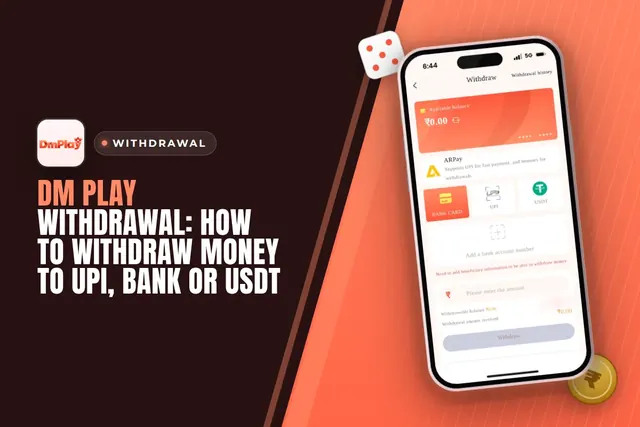
Cash out from DM Play via UPI, bank card, USDT or ARPay. See the ₹110 minimum, 3 requests daily limit, 00:00-23:55 timing and fixes for common issues.

DM Play bonus offers for Indian players: new member package, 2% first deposit refund, invitation bonus, Super Jackpot, lucky wheel, gift codes and rules.
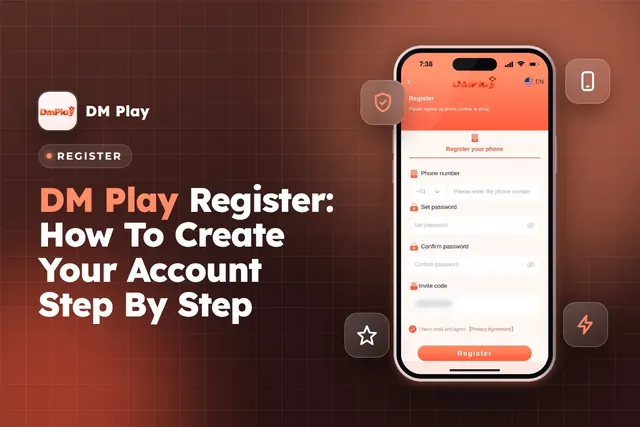
DM Play register steps for India: sign up with phone or email, enter invite code 216651031605, set a safe password and avoid common account mistakes.

Find DM Play customer care under the Account tab, see what details to share for deposit or withdrawal issues, and how to avoid fake contacts.
Ready To Play On DM Play?
Register on DM Play in a minute and explore the games and offers.