
DM Play Add UPI: How To Add A UPI ID Or Change Bank Details For Withdrawals
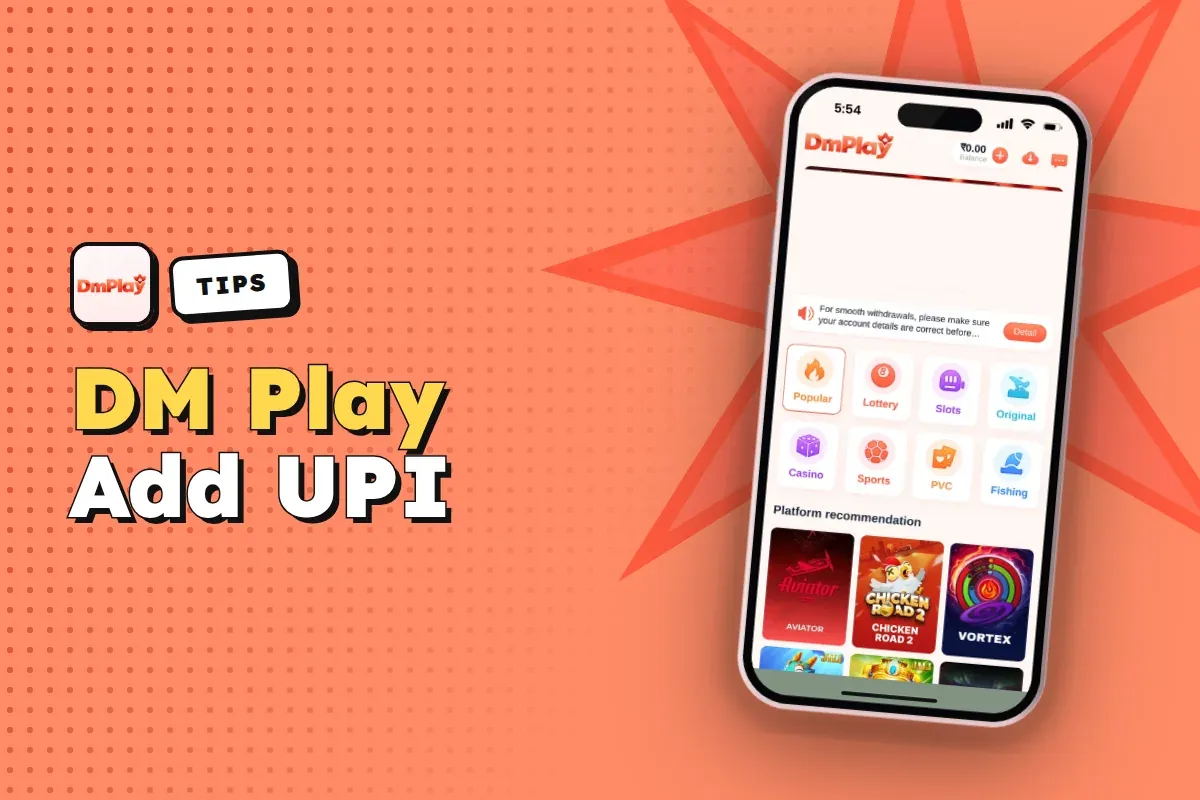
To add a UPI ID on DM Play, open Account, tap Withdraw, choose the UPI tab and tap Add UPI. Then fill in your UPI Name, a real phone number and your UPI ID twice, and tap Save. It takes about two minutes, but what you type here decides where every rupee you withdraw ends up.
On apps of this kind, most payout trouble starts at this step rather than at the cashier. One incorrect character in a UPI ID, or a name that differs from your bank's records, may freeze your funds for days. Once saved, the first payout account name is locked, so you effectively get a single attempt to enter it properly.
Below you will find the exact fields, the mistakes that cause trouble, how bank account and IFSC details work, and what to do when something is already saved wrong.
- Where To Add
- Account → Withdraw → UPI
- UPI Fields
- Name, phone, UPI ID twice
- Bank Fields
- Name, account, phone, IFSC
- Payout Name
- Locked after first save
- Withdrawal Methods
- Bank card, UPI, USDT, ARPay
- Fix Wrong Details
- Contact Customer Service
Quick Menu
How To Add A UPI ID On DM Play
You add a UPI ID from the Withdraw screen inside your account, not from the Deposit page. Deposits by UPI work without saving anything, but to withdraw money to UPI, the app needs a saved UPI payout method first.
Do this before you need the money. Say you win ₹2,000 on a Saturday night and only then start adding details: one typo and you are waiting on support while your balance sits there. Set it up on day one, right after your first DM Play login, and the withdraw button is ready whenever you are.
- Log in to the DM Play app or mobile website with your phone number or email and password.
- From the bottom menu, open Account and choose Withdraw.
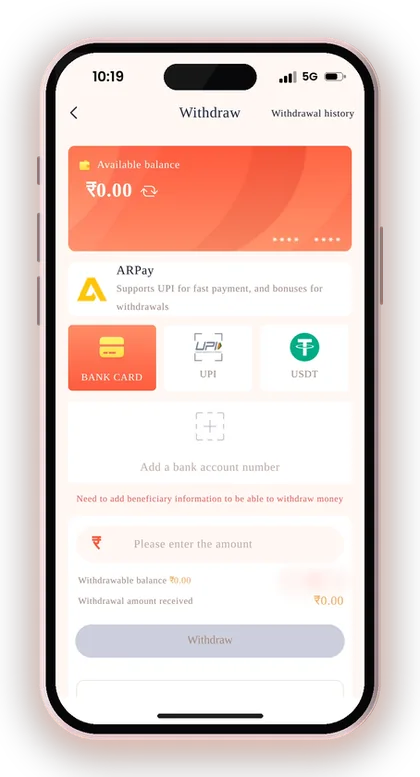
- Choose the UPI tab among BANK CARD, UPI, USDT and ARPay.
- Tap Add UPI to open the Information UPI form.
- Type your UPI Name exactly as your bank shows it.
- Enter your real mobile number in the Phone Number field.
- Enter your UPI ID in the first box and repeat it in the Confirm UPI ID box.
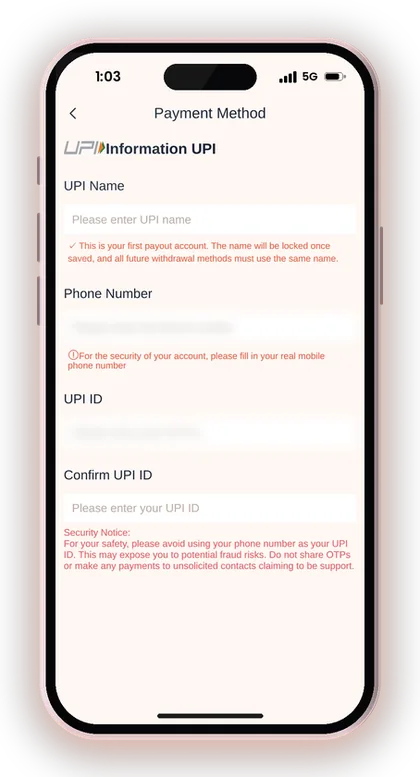
- Read the security notice and tap Save.
Useful Advice: Rather than typing your UPI ID from memory, copy it from the profile section of your UPI app. Even one wrong character sends the request nowhere.
How To Fill In Each UPI Field Correctly
Each field on the Add UPI form has a job, and getting one wrong usually shows up only later, when a withdrawal fails. Here is what each one needs and why.
What Name Should You Enter As UPI Name?
Enter the name on the bank account linked to your UPI ID, spelled the way your bank spells it. If your passbook reads RAHUL KUMAR SHARMA, do not type Rahul Sharma or a nickname.
Payment systems often compare the payee name with the bank record. A short form or a family member's name is one of the most common reasons a withdrawal gets rejected and the money returns to your balance hours later.
Why The App Asks For Your Real Phone Number
The form asks for your real mobile number for the security of your account. Support uses it to check that the person asking for help is the account owner, so a borrowed or old number makes recovery harder.
Use the number you actually carry. If you ever need to prove ownership of a payout method or reset your password, a number you no longer have access to turns a five-minute fix into a long back and forth.
Should You Use Your Phone Number As Your UPI ID?
No. A security notice inside the app tells users not to use their mobile number as a UPI ID, since that may make them targets of fraud. Several UPI apps generate an ID such as 98xxxxxx@bank automatically, but most also allow you to choose another one.
A UPI ID built on your number tells strangers your mobile number, and scammers use it to send fake collect requests or call pretending to be support. Use an ID based on letters, such as a name-based handle your UPI app offers.
Why Confirm UPI ID Matters
Confirm UPI ID makes you type the ID twice so a single typo is caught before you save. Type it fresh the second time instead of pasting the first entry, otherwise the same mistake gets copied.
Check the part after the @ sign carefully. Mixing up handles like @ybl, @okaxis or @paytm is easy, and a wrong handle can point to a different account or to nothing at all.
Why Is The First Payout Account Name Locked On DM Play?
Whatever name you save for your first payout account gets locked, and each withdrawal method added afterwards has to carry that same name. A warning about this appears on the Add a bank account form, just before you press Save.
This rule stops one account from sending money to many different people, which is how stolen accounts and bonus abuse usually work. For you, it means the first save is close to permanent, so treat it like filling in a bank form.
What Happens If You Typed The Wrong Name?
You cannot edit a locked name yourself; you have to contact Customer Service and explain the mistake. Expect them to ask for proof that you own the account, such as the bank details and the phone number registered on the app.
Do not try to fix it by adding a second method under the correct name. The app will not accept a different name, and repeated attempts can look suspicious on the account.
Can You Add A Family Member's Account?
Only if that person's name is the one already locked on your account. Since every method must carry the same name, you cannot mix your own UPI with your brother's bank account.
The safest choice is a UPI ID and bank account in your own name. Promotions like the Wheel Spin also check payment methods, and rewards can be claimed only once per bank account, phone number and IP address, so shared accounts create problems quickly.
Useful Advice: Before you tap Save, open your bank app and compare the account holder name letter by letter with what you typed.
How To Add A Bank Account And IFSC Code
To add a bank account, tap Account, then Withdraw, choose BANK CARD and tap Add a bank account number. The form asks for your bank, the full recipient's name, account number, phone number and IFSC code.
Bank card withdrawals have a much higher upper limit than UPI, so players who expect larger amounts usually add both. Just remember the name you enter here follows the same locking rule if this is your first payout account.
- Tap Choose a bank and select your bank from the list.
- Type the full recipient's name exactly as printed on your passbook or cheque.
- Enter your bank account number carefully, digit by digit.
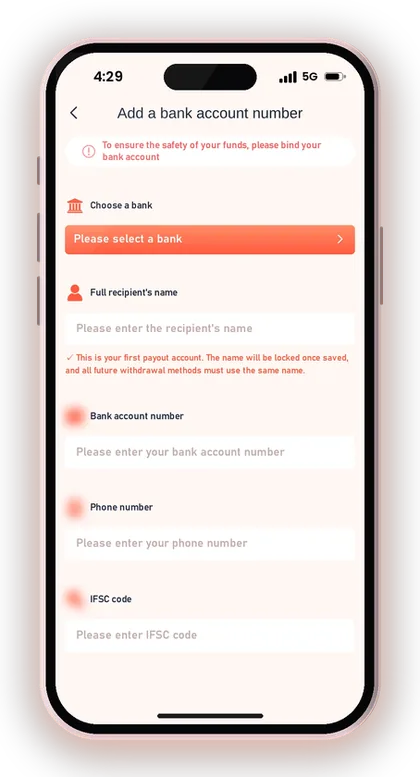
- Add your phone number.
- Enter the IFSC code of your own branch.
- Check every field once more and tap Save.
Useful Advice: Take the IFSC from your cheque book or bank app, not from a search result, since branches of the same bank have different codes.
DM Play Change Bank Account Or IFSC: What To Do
If your registered bank information is wrong, the withdrawal page tells you to contact customer service; there is no self-edit button for saved payout details. Go to Account, open Customer Service, and explain what needs fixing.
The platform will not be liable for any loss caused by incorrect bank details either. It is best to check and fix your details before you place a withdrawal request, because once the funds reach the wrong account, nothing can be done.
How To Ask Support For A DM Play IFSC Change
Send one clear message with your registered phone number, the method you want corrected, the wrong detail and the correct one. For a branch move, give both the old and new IFSC code.
Attach a screenshot of the correct details from your bank app if support asks. Clear, complete messages get handled faster than a chain of short ones, and you avoid repeating yourself to a new agent. The DM Play customer care options lists where to reach them.
What If A Withdrawal Already Went To Wrong Details?
Contact support at once with the order details from My withdraw history. If the account number or UPI ID did not exist, the payment usually fails and returns, but that is decided by the payment system, not you.
If the money reached a real but wrong account, recovery is difficult. This is the scenario the confirm field and the warnings are trying to prevent, so double-checking costs you less than any fix.
Changed Your Bank? Add Details Before You Close The Old One
If you are switching banks, ask support to update your payout details while the old account is still open. A withdrawal sent to a closed account can take a long time to come back.
Keep the same account holder name on the new bank. Because the payout name is locked, a new account in another person's name will not be accepted.
Useful Advice: Only contact support through the Customer Service option inside the app; nobody genuine will message you first asking for an OTP.
UPI Vs Bank Card Vs USDT For DM Play Withdrawals
For most players in India, UPI is the easiest option to set up. A bank card works better for bigger amounts, and USDT fits anyone who already has a crypto wallet. Every option follows the same withdrawal timing of 00:00 to 23:55, with three withdrawals allowed per day.
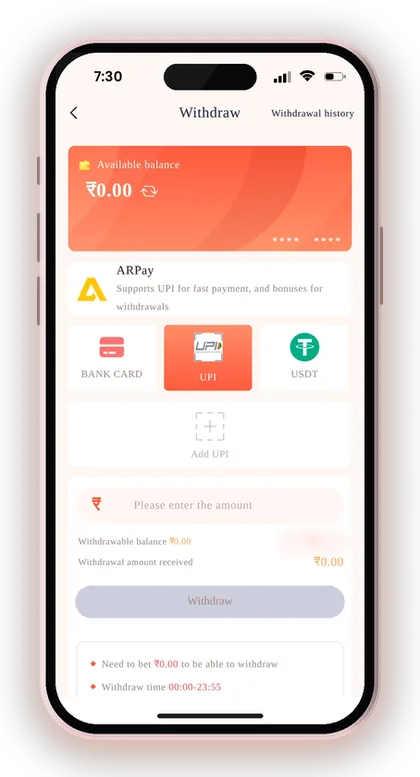
The real difference is the range. Pick the method that matches the amounts you actually expect to withdraw, and keep a second one saved as a backup. Full details by method sit on the DM Play withdrawal limit page.
| Method | What You Save | Withdrawal Range |
|---|---|---|
| UPI | UPI Name, phone, UPI ID | ₹110 – ₹50,000 |
| Bank Card | Bank, name, account number, phone, IFSC | ₹110 – ₹10,000,000 |
| USDT | TRC network and USDT address | ₹1,030 – ₹10,000,000 |
Useful Advice: If you plan to withdraw more than ₹50,000 at once, add a bank account as well, because UPI cannot handle that amount in one request.
Other Payout Options: USDT Address And AR Wallet
To withdraw in USDT, you add a USDT address under the USDT tab, select the TRC main network, paste your address and give it an alias. After you withdraw, the transfer needs three blockchain confirmations before it reaches your wallet.
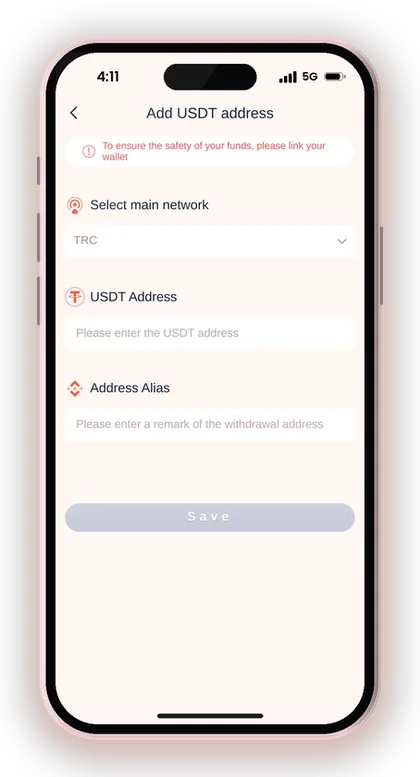
Always choose TRC and use a TRC20 USDT address. Sending on the wrong network is the classic crypto mistake, and the app warns that assets sent wrongly may not be recovered.
Is AR Wallet Worth Activating?
AR Wallet is an external payment service. You send your balance to it, then sell ARB via UPI to receive rupees, and you earn additional rewards for doing this. First, you must activate it from the ARPay tab.
It may be useful if your bank flags frequent transfers, because funds reach UPI only at the time you sell. The cost is an extra app and an extra step, which is why most players begin with plain UPI and bring in AR Wallet afterwards.
Common Mistakes When Adding Payout Details
Most failed or delayed withdrawals trace back to a small slip made on the day the payout method was saved. These are the ones that come up again and again.
- Entering a shortened name or nickname that differs from what the bank has on record.
- Using a phone-number UPI ID even though the app warns against it.
- Pasting the UPI ID into both fields, so the confirm check catches nothing.
- Taking an IFSC code of a different branch of the same bank.
- Saving a relative's account and finding the locked name blocks your own later.
- Trying to withdraw before your total bet requirement reaches zero, then blaming the payout method.
- Sharing an OTP with someone who claims to be support on WhatsApp or a call.
Useful Advice: Make a small first withdrawal to test a new UPI ID before you request a large amount.
Before Your First Withdrawal: A Short Checklist
Once your UPI or bank account is saved, a withdrawal also needs your login password and a cleared bet requirement. The beginner's notes in the app say your total bet must reach zero before you can withdraw.
Many beginners deposit, play a few fast rounds and request a withdrawal straight away, only to discover that the betting requirement hasn't been completed. If short rounds appeal to you, Win Go 30 sec vs 1 min rounds sets the two side by side and shows how quickly your bets add up. Outcomes are entirely random, so deposit only what you can afford to lose.
- UPI ID or bank account saved in your own name
- Correct IFSC code for your branch
- Total bet requirement at zero
- Login password ready
- Request placed between 00:00 and 23:55
Do Not Have An Account Yet?
Signing up needs a mobile number or email address, a password and an invite code. The Invite Code box cannot be left empty, so enter 216651031605 there on the DM Play register page.
Use your own phone number from the start. The number you register with should match the real number you later put on your UPI form, which keeps account checks simple.
Forgot Your Password Before Withdrawing?
The withdrawal asks for your login password, so a forgotten one blocks payment. Use Forgot password on the DM Play login page or contact customer service to set a new one.
After resetting, change it to something strong from Account, then Settings, and keep it private. Anyone with your password could change details or request withdrawals.
Useful Advice: Only users above 18 can play; set a daily spending limit for yourself before you deposit.
Staying Safe: Fake Support And The DM Play Hack Myth
There is no such thing as a DM Play hack. Anyone or any app that offers one, or says it can foretell Win Go results, is trying to scam you out of money or payout details. Results are random, and nobody can sell you a way around that.
Such scammers commonly ask for your UPI ID, an OTP or your login password, claiming they will add credit. The app's notice states it plainly: never share OTPs, and never pay anyone who approaches you posing as support. Stick to the official DM Play app or website, and find more practical guides on the DM Play blog. To understand how payouts work in full, visit the DM Play withdrawal steps page.
Useful Advice: If someone asks for your OTP, end the conversation; genuine support never needs it.
Doubts Cleared Here
Where do I add a UPI ID on DM Play?
Open Account, tap Withdraw, choose the UPI tab and tap Add UPI. Fill in UPI Name, Phone Number, UPI ID and Confirm UPI ID, then tap Save.
Can I use my phone number as my UPI ID?
The app discourages it, as a UPI ID made from a phone number can leave you open to fraud. Choose a UPI ID made of letters in your UPI app instead.
Why can I not change my payout name?
The name on your first saved payout account gets locked in, and each method you add afterwards must show exactly the same name. If you entered it wrongly, contact Customer Service to have it corrected.
How do I change my bank account or IFSC code?
There is no self-edit option for saved bank details. Contact Customer Service from your account with your registered phone number, the wrong detail and the correct one.
What is the UPI withdrawal range?
UPI withdrawals range from ₹110 to ₹50,000. For larger amounts, a bank card allows up to ₹10,000,000 per request.
How many withdrawals can I make in a day?
You get three withdrawals a day, placed between 00:00 and 23:55. This applies to bank card, UPI and USDT.
Can I add a family member's bank account?
Only if it carries the same name already locked on your account. It is best to use a UPI ID and bank account in your own name.
Do I need an invite code to register?
Yes, the register page requires the Invite Code field. Type 216651031605 while signing up.
You May Also Like
Cash out from DM Play via UPI, bank card, USDT or ARPay. See the ₹110 minimum, 3 requests daily limit, 00:00-23:55 timing and fixes for common issues.
Find DM Play customer care under the Account tab, see what details to share for deposit or withdrawal issues, and how to avoid fake contacts.
DM Play Login for players in India works with your +91 mobile number or email. Learn how to reset a forgotten password and fix sign-in issues.
DM Play minimum deposit is ₹100 by UPI. See every deposit and withdrawal limit for UPI, USDT and bank card, daily withdrawal count and timing rules.
Ready To Play On DM Play?
Register on DM Play in a minute and explore the games and offers.